
QLIPP Tennis1.4.13 - Get APK
You'll be able to download in few seconds.
Publisher Description

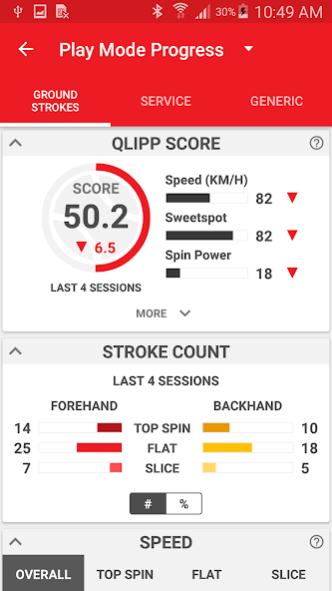
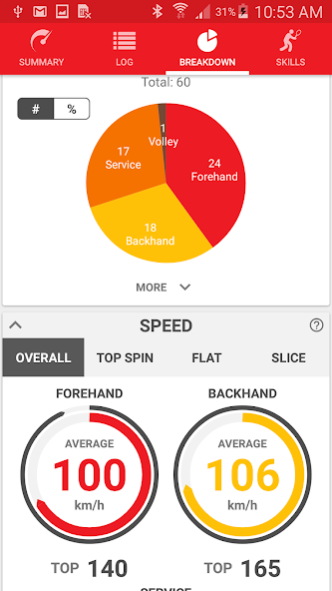
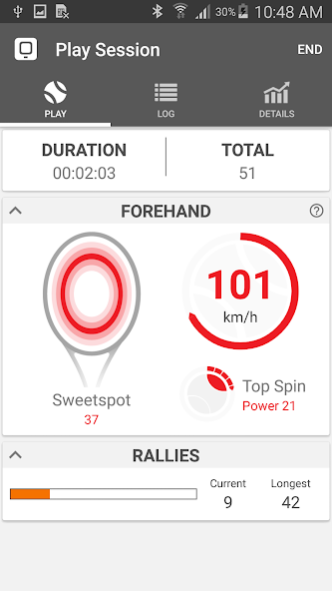
The Qlipp Tennis Sensor allows every player to get an overview of their tennis game and easily compare and share with their friends. With real-time stroke feedback, players can quickly adapt and improve their game, during the game. The Qlipp Tennis Sensor can be easily attached on all tennis racquets. Just attach the sensor on any tennis racquet, connect to the app and track your game like never before.
Features:
- Connect the Qlipp Tennis Sensor to the app easily in seconds!
- The app will record every stroke and provide real-time stroke-by-stroke analysis as you play.
- Review how you performed at the end of the game with a detailed overview of all the recorded strokes.
- Video yourself play and watch slow-mo playback of any stroke recorded during the game.
- Track your progress, strengths and weaknesses with every recorded game!
Find out more:
Official website - https://www.qlipp.com/
Instagram - https://www.instagram.com/qlippsensor/
Facebook - https://web.facebook.com/QlippSensor/
Google+ - http://google.com/+QlippSensor
Get your QLIPP sensor at:
https://www.qlipp.com
http://amzn.com/B01873ZACY
http://igg.me/at/qlipp
Note:
- Some older (2012 and earlier) Android devices might not be able utilize the QLIPP sensor to its full potential due to limitations of the Bluetooth hardware on the Android device.
- Requires the QLIPP sensor to work.
Permissions:
Location (only for Android 6.0 and above) - This is required by Android to search for nearby Bluetooth Low Energy devices, in our case, the QLIPP sensor.
About QLIPP Tennis
The company that develops QLIPP Tennis is 9 Degrees Freedom. The latest version released by its developer is 1.4.13.
To install QLIPP Tennis on your Android device, just click the green Continue To App button above to start the installation process. The app is listed on our website since 2017-09-15 and was downloaded 0 times. We have already checked if the download link is safe, however for your own protection we recommend that you scan the downloaded app with your antivirus. Your antivirus may detect the QLIPP Tennis as malware as malware if the download link to com.degrees9.android.qlipptennis is broken.
How to install QLIPP Tennis on your Android device:
- Click on the Continue To App button on our website. This will redirect you to Google Play.
- Once the QLIPP Tennis is shown in the Google Play listing of your Android device, you can start its download and installation. Tap on the Install button located below the search bar and to the right of the app icon.
- A pop-up window with the permissions required by QLIPP Tennis will be shown. Click on Accept to continue the process.
- QLIPP Tennis will be downloaded onto your device, displaying a progress. Once the download completes, the installation will start and you'll get a notification after the installation is finished.
Program Details
System requirements
Download information
Pricing
Version History
version 1.4.13
posted on 2017-09-15
Revision of embarrassing bugs on Health and Sharing sections
Sharing of selfies with personalized tennis statistics
Selection of ball type to include touchtennis balls
Ability to customize racquet weight
Selection of ball type to include touchtennis balls
version 1.4.4c
posted on 2016-12-18
=== New ===,-Improved stroke detection algorithm. Stroke detection should be much more accurate.,-Localized languages!,v1.4.4.c,-Fixed bug causing app to crash on devices below Android 5.0,-Fixed bug causing some devices to not be able to connect to the QLIPP sensor
Disclaimer
External Download
We do not host QLIPP Tennis on our servers. We did not scan it for viruses, adware, spyware or other type of malware. This app is hosted by Galad and passed their terms and conditions to be listed there. We recommend caution when installing it.
The APK Download link for QLIPP Tennis is provided to you by apps112.com without any warranties, representations or guarantees of any kind, so access it at your own risk.
If you have questions regarding this particular app contact the publisher directly. For questions about the functionalities of apps112.com contact us.
